Now that the majority of the U.S. is hunkered down at home as the nation reels from the coronavirus outbreak, many people have opted for procuring groceries from Amazon Fresh and Whole Foods, having them delivered rather than venturing down the contaminated aisles of their local grocer.
The boon in the use of services like Whole Foods, Amazon Fresh and Instacart has also resulted in a flood of activity that has increased the wait time for many customers, resulting in delays that frustrate a public already dealing with shortages due to hoarding.
Each of the aforementioned services offer delivery windows to customers, giving them the choice of when their order can be dropped off. Unfortunately, with so many people rushing to take advantage of online delivery, the windows for delivery are now almost always closed.
That poses a huge problem for the most vulnerable in this crisis, such as the elderly and those suffering from pre-existing conditions.
Because of this, whiz kid Adrian Hertel, a computer science minor at Georgetown University, put together a basic computer program that will notify users of when new slots for delivery are available on Amazon Fresh and Whole Foods. His program works in the Safari web browser, so you’ll need a Mac to use it.
Here is how it works:
Make sure you’re ready when using it, because the program depends on you being prepared to pay for the order.
You will first have to open Safari on your Mac and visit Amazon to put food in your Amazon Fresh or Whole Foods cart. Once you’ve selected everything you need, move to the final screen, which will usually – under normal circumstances – prompt you to choose from the available delivery times. Leave your web browser on this screen and proceed.
What Hertel created isn’t necessarily a program, being more of a script that runs in the background and keeps refreshing the browser. To initiate the process, follow these instructions:
Open the ZIP file once it’s finished (it’ll only take a few seconds).
Now leave that folder open, we’ll come back to it in a second.
Change some settings in the Safari web browser on your Mac
To get the script running properly, you’ll need to change some settings in your browser:
Open Safari on your Mac.
Tap command and comma on your keyboard at the same time, this opens Safari Preferences.
Choose “Advanced” on the page that pops up.
Go to the bottom and click “Show develop menu in menu bar.”
Go back to your Safari window.
Click “Develop” on the top of the screen.
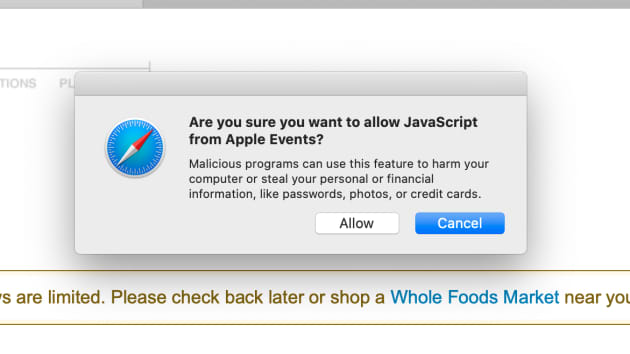
Choose the option that says “Allow JavaScript from Apple Events” so that it’s enabled.
The script requires your computer to always be on, so make sure it’s plugged in and set not to go to sleep. To do this:
Tap the Apple icon on the top left of the screen.
Choose “System Preferences.”
Select “Energy Saver.”
Click “Power Adapter”
Make sure the option to turn display off is set to “never.”
Do the same under the “Battery” menu if you want to run this script on a battery, but you should leave your computer plugged in.
Bonus tip: Turn up your Mac volume. We’re going to set up text message alerts, but if you’re near your Mac you’ll also hear an alert when a time slot becomes available.
Run the script
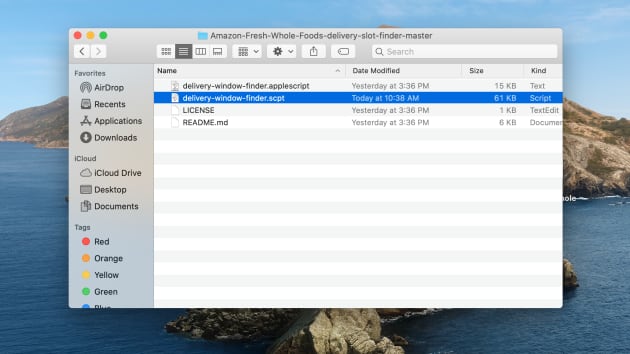
Open the folder of files you downloaded.
Open “delivery-window-finder.scpt.”
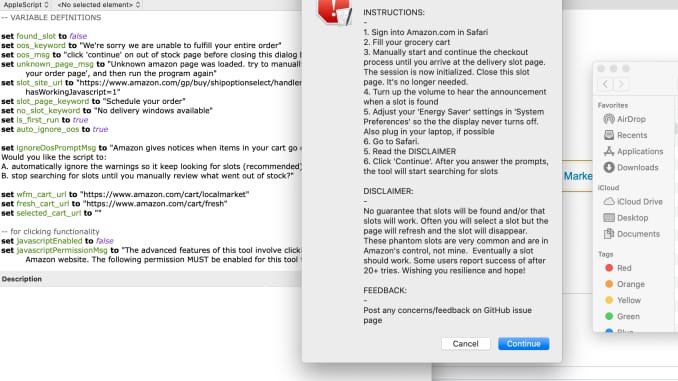
Hit the play button at the top of the screen.
Tap “Continue.”
Choose whether you’d like the script to keep looking for slots if it finds items in your cart have gone out of stock, or whether you want it to proceed anyway. (If you desperately need toilet paper and don’t want the order if it runs out of stock, choose “B. wait for me to review.” Otherwise, choose “A. Keep looking for slots.”)
Click “Done” on the screen that tells you to set up Safari properly, since we did that in the last section.
Select “Yes” if you want to enter in a phone number for a text message alert, otherwise just rely on your computer’s speakers to tell you when a slot is available.
Choose whether you’re checking out with Whole Foods via Amazon.com or Amazon Fresh.
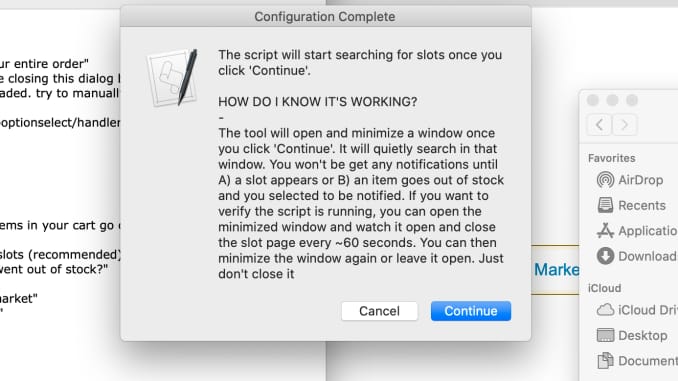
Click “Continue.”
After that’s done, a window will open and will minimize itself. This is the script running. It’ll constantly refresh your checkout page until a time slot opens up.
Wait
Now, it’s running on autopilot, refreshing the cart until it lands on an open delivery window. You should know that there’s no guarantee this will secure a spot, given how many people are searching for the same windows, but it’s sure to make the process less time consuming and relieve a bit of the frustration.
If you need help setting this script up, you can always depend on one of our skilled technicians to assist you. We’re here to aid you in any way we can.
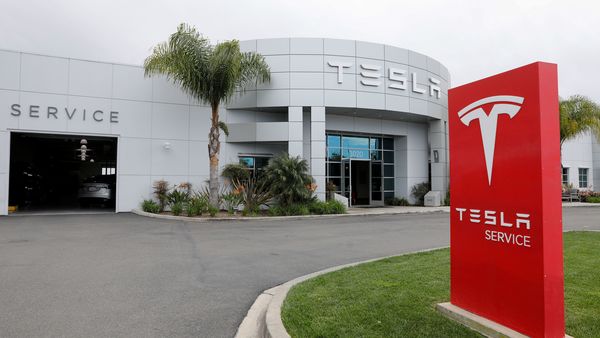
A month back, Tesla CEO Elon Musk communicated some doubt about the seriousness of the coronavirus pandemic, however that hasn’t halted Tesla engineers from attempting to address the urgent need of ventilators in American medical clinics confronting a torrent of COVID-19 cases.
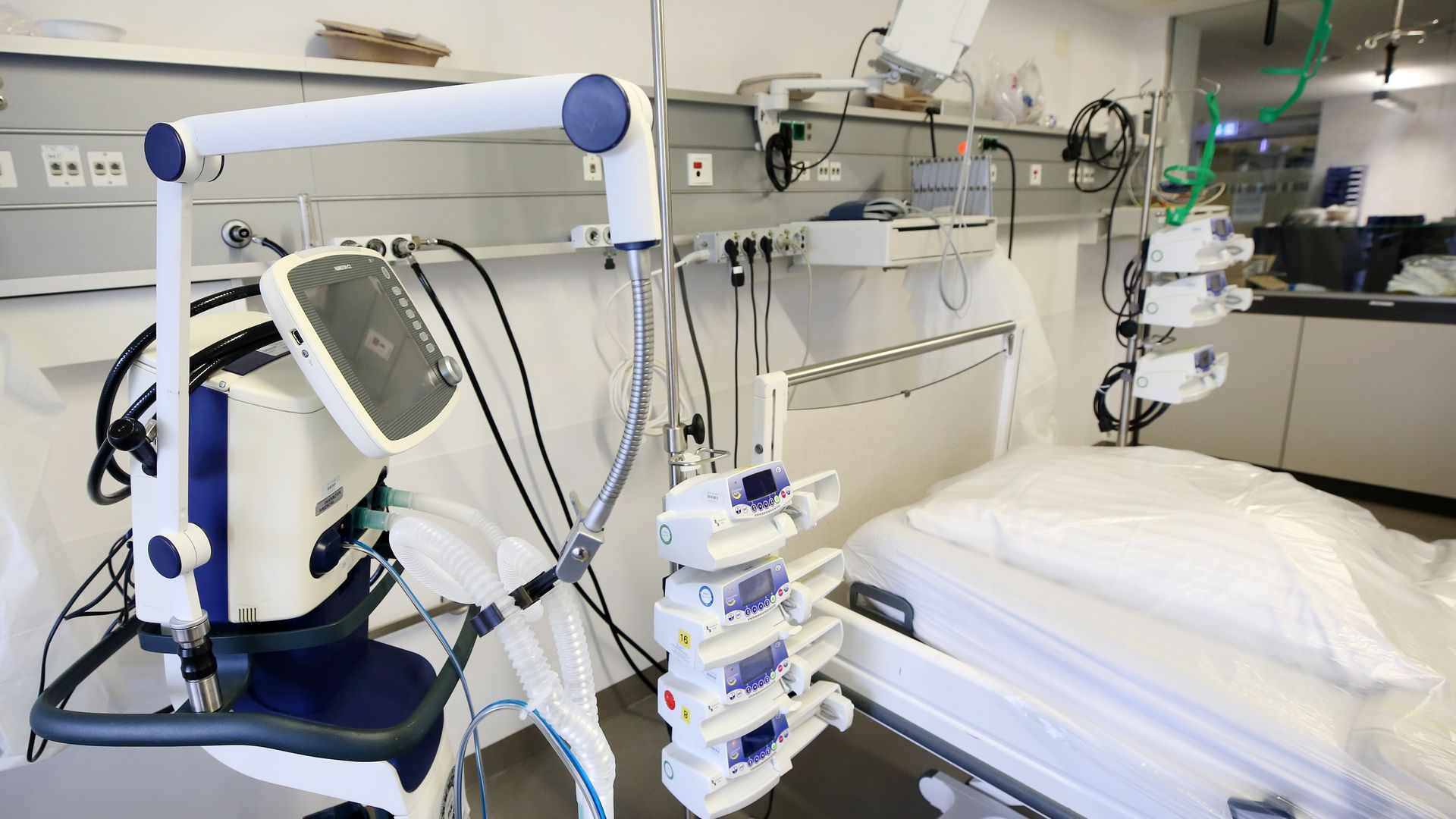
The organization is now mobilizing to use an enormous stock of automobile parts to assemble ventilators that will hopefully reinvigorate the country’s inventory of the life-saving breathing machines. At the present time, it’s unknown whether Tesla’s engineers have conferred with clinical specialists or professionals in the respiratory field to glean input on the design of their their ventilators.
Tesla has yet to offer a timeline and road map for when the conceptual planning of their ventilator would move towards the manufacturing stage. Even after that takes place, the machines would almost certainly still require stringent quality assurance testing that could delay their roll out by a year or even longer. However, in light of the national emergency facing the nation, the U.S. Food and Drug Administration has expressed a desire to ease regulations to facilitate rapid production of the devices.
While Musk has caught flack for initially dismissing the severity of the coronavirus, the entrepreneur has since donated considerable amounts of medical equipment purchased from China to hospitals around the U.S.
Musk has shared plans to reopen Tesla’s Buffalo, New York factory to aid in its production of the ventilators. This in addition to coordinating with ventilator manufacturers who will use Tesla’s supply chain to bolster their output of the devices.
U.S. hospitals have 160,000 ventilators on hand, a number that falls short of what’ll be required to meet the wave of cases that are sure to balloon once infections spread. If Tesla is able contribute its engineering might to the fight against the virus, Elon Musk is sure to be remember for the helping hand.
Microsoft believes hackers are taking advantage of a an undisclosed security exploit found in all supported versions of Windows, including Windows 10.
The problem exists in the way Windows creates fonts. The hack tricks users into opening a document that has malicious files attached to it. After the document is opened, or even viewed, the hackers gain remote access to the user’s computer.
A warning from Microsoft cautions users that they are aware of the attempts to breach Windows security. However, they acknowledge that they do not know who is the source of these attacks.
Microsoft is fast at work to shore up this security leak and release a patch to consumers. The best advice, in the meantime, is to be vigilant and perform routine virus scans on your computer. You should also keep a watchful eye for any suspicious behavior after opening documents.
The Company usually releases security fixes on the second Tuesday of each month, so be on the lookout.
It seems that even the apps our children use aren’t immune to malware. Security specialists have uncovered multiple apps in Google’s Play Store that are infected with malware. 56 apps were infected with a virus that farmed ad clicks to earn money, and 24 of those were games that targeted children.
This infestation of malware was uncovered by Check Point Software, a company that specializes in finding solutions related to IT security. According to researchers are the firm, the malware named ‘Tekya’ exploits a function of Android that lets it mimic the user of the device, allowing the hackers to click on ads and banners.
Some of the apps were of the mundane variety, such as calculators and recipe books. The other apps were games for kids – puzzle, racing, etc. The 56 apps that were infected had a total of almost 1 million downloads.
This breach is a sign that, while security measures by Google have been significantly strengthed, there is still a good deal more than could be done to curtail the shenanigans of hackers. Posting in a blog about the progress it’s made in terms of security, Google said that it has removed hundreds of thousands of apps that violated its Play Store policies. And, even more impressive, it prevented a staggering 1.9 billion installations of malware from non-Google Play sources in 2019.
This makes it clear that Google has made it a priority to protect its users and clean its Play Store of apps that target them for malicious purposes.
IT specialists are building a database filled with repair information for the world’s hospital equipment in anticipation of the increased demand caused by COVID-19, the disease caused by the novel coronavirus. They are working on repair manuals for ventilators and Bipap machines.
The world’s supply of ventilators is under huge stress. This equipment will be an essential part of treating anyone who develops respiratory problems as a result of COVID-19.
There are currently few sources for repair manuals of ventilators and Bipac machines online. Resources like Frank’s Hospital Workshop exist, but these are relatively small operations. Some manufacturers provide easy access to repair manuals on their websites, but others make them harder to find or restrict access behind a paywall.
These IT specialists wants to compile the information and make it as easy to understand as possible. The plan is to break the manuals down into guides for individual repairs. They will make the guides SEO friendly and translated for multiple languages.
They also want to put together preventive maintenance guides to keep their equipment in good working order.Appeals are being made to the medical community for information about which ventilators are most likely to break.
This is an important initiative from a concerned body of IT professionals helping to combat this threat. We’ll continue monitoring the developments in the fight against the pandemic and keep you updated.
Geek Choice is your solution for Apple computer repair
Now that Apple has closed all its retail and computer repair stores outside Greater China, where else can you go for your Apple fix? As the coronavirus continues to spread, Apple has closed all of its stores outside Greater China until further notice. Beyond selling products, Apple’s retail stores are also go-to places for Apple computer repair. This includes the Macbook family of laptops and the iMac. The stores are convenient as their specialists can diagnose the symptoms of a non-working system, replace damaged screens, and swap out defective parts. But with the stores temporarily closing, you do have have another option for your computer repair needs.
Here at Geek Choice, repairing computers is our specialty. All of our technicians are experts on troubleshooting Apple computers. Our staff is skilled in addressing the issues that owners of Apple computers experience. Whether you need to retrieve data from a faulty hard drive or simply transfer it to another computer, or if your operating system isn’t working properly, our technicians are here to assist you every step of the way. Making sure your computer is free of problems should be our concern, not yours.
Remote Computer Service is available by calling us or visiting our website. ? All you need is a working internet connection and access to your computer. Our company will be able to provide remote computer service expertise that we’ve built a 20 year pedigree on. ? Below is a list of services we offer because we have a variety of techs: ?
We are taking guidance from the Centers for Disease Control, which recommends regular cleaning. Our staff has increased the frequency and rigor of car, equipment, and office cleaning because of the increased risk. We’re taking extra care to wipe down equipment, vehicles, keyboards, touch screens, and phones. However, remote computer service demand has increased and we have hired more technicians to fill this demand. We are also monitoring all locations and technicians to ensure they are stocked with the appropriate cleaning supplies.
We are also advising staff to wash hands frequently, avoid shaking hands with others, and practice social distancing. This will help them stay healthy as we know people still need service. Friendly waves and smiles are still okay!
So, as the 2020 US Presidential election intensifies, one major issue will be education. But unlike previous decades, the focus won’t be ‘stay in school and pull up those grades’. This time, it will most likely be, “How will I pay for college?”. IT support is not immune. Let’s look at education ant IT’s future.
So you have Bernie Sanders talking about giving out free college altogether. Then you have Sen. Elizabeth Warren proposing to eliminate the 1.6 trillion in student loan debt altogether. That’s right: the US student loan debt is at an all-time high of 1.6 trillion dollars. Then you have Republican and Democrat senators working together to push for income share agreements. This would make higher education more affordable for all income brackets.
Maybe these initiatives will work. But maybe they won’t. Still, others are turning to alternative methods of higher ed, like Coding Bootcamp. This is a highly respected program that teaches you the IT skills many employers look for nowadays. Plus, companies like Google aren’t even looking for Ivy League degrees, or degrees at all, really. They’re just looking for people with high tech skills. Organizations like Coding Bootcamp provide that. So are many two-year community colleges and trade schools. They’re offering highly tech skills at a discount price. I hear of some cases where graduates of such schools land a $75,000+ job instantly!
If I had to talk to an 18-22 year old about education and IT’s future, I would tell him/her to be careful. First of all, I would tell them to pick a major they know employers are going to use. Sorry art and philosophy majors; this just isn’t going to cut it in 2019 America. I would tell them don’t be ashamed to go to two year schools or trade schools. Lots of people are coming out of those with good paying jobs and hiring bonuses. What advice would you have for a young person about education today?
So the World Health Organization declared Ebola to be a global health emergency…again. The new Ebola crisis: What can IT support do about it?
This started when a man unknowingly bought Ebola to Goma, Congo. Goma is one of Congo’s largest cities and is a huge tourist and transit hub. But since then, it’s worse. Because now, this new Ebola outbreak caused over 1,500 deaths and 2,500 illnesses just in Eastern Congo alone. But that’s just the beginning. Then, add lack of medical and tech resources, many years of conflict, and lots of cynicism. In fact, I read reports where medical and tech responders were killed when they tried to aid some of the medically ill. Because of these things, they expect this crisis to go on for a long time.
Now some of you are going to say, “Didn’t we go through an Ebola crisis around five years ago?”. Yes, the world sure did. In fact, over 30,000 people worldwide got sick during that mid-2010s outbreak. Also, it hit real close to home when two nurses got infected in Dallas. After a major scare, they treated those nurses, they fully recovered, and nothing came after that. Thank goodness! But this incident, and others globally, forced the world to pay attention and do something about it. And they did. So what’s the difference between then and now?
Well, now, there’s a lot more fear going on, and that fear often leads to violence. WHO leaders say that until they can secure that nation from conflict, then Elola will continue to flourish. Also keep in mind doctors, nurses and tech leaders will be less willing to aid in conditions like that. Also, and I hate to say this because I know how this will sound. But these things don’t get much notice until it hits a Western nation. I know that sounds awful, but look at humanity’s track record. So unfortunately, this is the new Ebola crisis. What can IT service do about it?
So many parents, even in computer repair, get Facebook Messenger Kids. They get it because they can control who gets on their kids’ pages. Think of it as a safety precaution. However, even the precaution went wrong. Let’s look at this Facebook Messenger Kids’ Error.
So according to The Verge, Facebook sent a message to parents. The message warned them about a technical error. This error allowed a child’s friend to start a chat in the app. However, these chats can go without the approval of the parent’s first child. I don’t want to confuse anybody. But basically, what this technical error does is remove a layer of safety and protection.
So far, Facebook is not making this totally public. They’re telling parents who may be affected by this tech error. Of course, it’s public know thanks to bloggers and tech journalists around the world. The Verge believes this flaw left thousands of kids in unsupervised chat rooms.
And I think this is the panic here behind this Facebook Messenger Kids’ error. Some may say, oh, it’s only one snafu, it’s only one error of protection that went away. What’s wrong with that? What’s wrong with that is that’s all it takes. Let’s face it: The criminals, traffickers and perverts are getting smarter and smarter with technology. That’s not good. Then there are other kids who want to bully or threaten another kid. This missing layer of protection can mean easy, easy pickins’ for these bullies. So you have two kinds of people already that can use this to their advantage. What are some others? And what can we do to keep out kids safe?