Oct 25, 2010 | Computer technology, General, networking
By Sean Wilcoxson
The world of Wi-Fi has come a long way since its inception 11 years ago. Today there are over 700 million users with 1 billion devices hooked up to it increasing at a rate of 8 million new devices a year. Stores everywhere offer the easy use of Wi-Fi with 750,00o hot spots around the globe; getting plugged in and surfing the net on your phone, laptop, iPod, and iPad makes business, communication, and life better.
Life keeps on getting better with the new concrete technology of Wi-Fi Direct.
Wi-Fi Direct offers peer-to-peer(P2P) connections between your devices without a traditional Wi-Fi access point or network. In other words, you can connect right to a friends portable game system like PSP and play a game real-time as long as you are within 200 yards of each other. Or you can send a picture from your camera that has Wi-Fi Direct to a digital picture frame or printer, instantaneously.
This is perfect for a businessman or a salesman who has a laptop or smartphone with Wi-Fi Direct enabled to publish a presentation right to the customer’s office without any wires or physical connections. How easy is that!
A little history of Wi-Fi:
The first ever wireless Internet network showed up at Carnegie Mellon University in Pittsburgh six years before it spread all over the world in 1999. Most colleges now how access to wireless networks.
The name Wi-Fi stands for Wireless Fidelity, like Hi-Fi or High Fidelity audio equipment, and does not mean anything at all. It is just a little catchier than the actual name: “IEEE 802.11b Direct Sequence”. It was coined by a company who worked for the W-Fi Alliance. People see the name Wi-Fi everywhere and it has become the standard for internet connectivity because of its interoperability. That means that two or more systems can exchange information, and with the use of Wi-Fi it is done simply over wireless networks.
What about security?
Wi-Fi Direct is so new that the drawbacks and glitches are yet to be discovered, a trial and error technology, but the advantages are vast. The makers behind the new technology say that Direct is saturated in security protocol and is protected enough to stop attacks. Others disagree, because any device can become and access point. You will just have to have faith since it is so new and coming out into the world. We shall see what happens in the future with this technology.
This is a technology that has unlimited possibilities for business, pleasure, and everything in between when it comes to access and communication. Imagine, no more will you have to suffer the music of Starbucks just to get to your email, or put up with limited access because of a weak connection.
Oct 22, 2010 | Computer Repair, General, News
By Sean Wilcoxson
Let?s say someone has been using their computer for five years. At first it runs smoothly for a couple years with no problems. But over time, and through no fault to the user, the place where operations run called the registry gets cluttered.
You do not want to buy a new computer, so what do you do? To go in to the registry on your own and try deleting a bunch of files thinking that it will make your computer run faster, is a fallacy. There are very sensitive files in the registry that if you delete by accident, even your computer?s basic functions will be compromised.
The best way to fix this problem is to go to a trusted source such as a program like Workstation Optimizer. This program will enable you to do what you cannot do for yourself, which is free up all that stuff that is cluttering your computer and make it run like it first did when you bought it.
If you are lazy or your computer is so full of crap that downloading anything will break its back, there are tools on your computer which will clean up disk space, thus allowing for smooth sailing. The Disk Cleanup tool that exists in Windows 7, XP, and Vista can work wonders for your computer.
You can use Disk Cleanup to:
- Remove temporary Internet files.
- Remove downloaded program files (such as Microsoft ActiveX controls and Java applets).
- Empty the Recycle Bin.
- Remove Windows temporary files such as error reports.
- Remove optional Windows components that you don’t use.
- Remove installed programs that you no longer use.
- Remove unused restore points and shadow copies from System Restore.
Another way to make your PC run better is to go to your Control Panel from the Start Menu, and click on Add/Remove Programs. Once in here you will see a list of programs that are most commonly used, like you internet, your anti-virus, and your work applications. But you will also find many programs that are not being used or that snuck in by downloads.
These extra programs take up that valuable space you need for work or play, regardless of why you use it, no one wants a slow retarded computer.
Check your start-up folder. Somehow a lot of random programs sneak into this folder and jump on you as soon as your computer boots. Most of these do not even tell you what they are doing, so they are invisible taking up CPU space if you do not take action. To solve this, go to your start up, click on All Programs, and you will see a folder called Startup. If there is anything in there that you did not intentionally put it in, delete it.
PC?s come with problems, so do these simple steps to eliminate these problems and turn them into costless solutions.
Oct 19, 2010 | Computer technology, email, General, networking, News, Software
Today Microsoft Office is on over a billion PC?s around the world. If you work in business or any company, chances are pretty good that email is involved, and Office is perfect for organization and ease of use.
Chris Capossela , who is the Senior Vice President of the Microsoft Office Division, has this to say on a new product that might interest users of Microsoft Office, and businessman who either own a small business or work in one.
?This is just the beginning; Office 365 allows us to take the Office suite and all the servers that go along with it, and move those to the Cloud with a world class productivity service. That really will define the next generation of productivity,? said? Capossela.
It looks like the world of computers and internet is improving for the better. Major factors involved include ease of use, how fast it is, and results. Microsoft Office 365 delivers every day of the year, hence the name.
?No other online service can provide the rich productivity capabilities of Office 365, the ease of use and depth of services, combined with the communication and collaboration of Exchange Online, SharePoint online, and Lync Online, deliver incredible benefits for organizations of all sizes,? said Betsy Webb, who is the General Manager for the Microsoft Office Division.
Small businesses that do not have formal IT staff but have big business needs for communication and collaboration will find a home here. Office 365 provides services for small businesses who want to get up and running in minutes.
You can share your work right with others with the broadcast capabilities of Powerpoint. Make a presentation on your laptop at the office and have that sent to the people who cannot make the meeting.
Sharepoint Online ?allows every employee of your company to have their own website, a sort of Facebook that allows each employee and employer to find each other and connect in ways they could not before.
Certain abilities like PC to PC communication are great for small businesses. Employees are able to work across distances with audio and video conversations, Microsoft Office 365 creates an easy living world in your business.
Here is a look at the specifics.
Microsoft Exchange Online is designed for organizations who want to get the benefits of cloud-based email without sacrificing the business-class capabilities that Exchange Server has been providing for decades.?Built on the same technology as Exchange Server 2010, Exchange Online provides organizations with the latest capabilities including built-in archiving, optional Conversation View, and MailTips, along with powerful web-based tools for managing online deployments.? With Exchange Online, Microsoft handles the ongoing maintenance, patches, and upgrades of the Exchange infrastructure while providing IT administrators the control and flexibility they require.
With SharePoint Online the services are there for you to make life easier. Manage and share personal documents and insights with colleagues using ?MySites?, a great feature like Facebook. Keep teams in sync with shared document libraries, task lists and calendars with Team Sites. SharePoint allows you to stay up to date on company news, events and business updates with Intranet Sites. Another good feature is the ability share documents and insights securely with partners and customers using Extranet Sites.
The last feature is called Lync Online. It is a next-generation cloud communications service that connects people in new ways, anytime, from anywhere. Lync Online provides intuitive communications capabilities across presence, instant messaging, audio/video calling and a rich online meeting experience including PC-audio, video and web conferencing. Transform your interactions with colleagues, customers and partners from today?s hit-and-miss communication to a more collaborative, engaging, and effective experience.
All in all, if you have a small business and already use Office 2007, the upgrade to Cloud could mean increases in productivity and results. Personally I have not checked out this Cloud business, as it is only in Beta form right now. It looks promising, with the future of communication happening today, I would check it out.
Oct 18, 2010 | Computer technology, email, General, Malware, News, scam
By Sean Wilcoxson
In this world of computers, technology, and the internet where information flows all around us there exist two types of people: surfers and sharks.
These are dangerous waters. Just last year there were 2.6 million threats in the form of Trojan and other viruses sent out all over the internet. How are we to keep safe when most of us do not even know what a virus looks like, and what is more, how to stop one.
The answer is in the password. There are many different techniques to stop hackers from getting into your computer, this one is crucial to prevention.
You might be asking: ?Why do I need to change my password??
First, let?s take a look at just what a malicious attacker can do with your password.
Recently a hacker masquerading as your friend Bob sent you an email asking for help with money or some other problem and to help him all he requires is your sensitive personal information. Hacker skills are vast in finding ways into your friend Bob?s email account. One way is through malicious software that simply records the information as he types it in, like taking candy from a Bob the hackers now have his sign-in data and can use that for whatever they wish.
Poor Bob did not change his password, left it at boob69, and now has to answer to a friend who lost a thousand dollars because he thought Bob was in trouble from an email he sent. This can happen to anyone.
Sometimes all it takes for a hacker to get your password is to guess. “You use a password that’s easy to guess, like your first or last name plus your birth date (‘Laura1968’), or you provide an answer to a secret question that’s common and therefore easy to guess, like ‘pizza’ for ‘What is your favorite food?,'” wrote Priya Navak, Google?s online operations strategist. Be creative with your password.
Gmail is a common target along with Hotmail, Yahoo, and social networking site Facebook for sharks to base their attack on surfers? privacy.
There is so much information out there it is easy for hackers to grab whatever they want simply by reaching out there hand. To put this in perspective, 247 billion emails are sent out per day, 81% of which are spam emails. That means that every day there are about 200 billion attempts at scams, viruses, and other malicious attacks on you.
This happened to me, and I almost cashed a check written out to me from a businessman who actually used a job finding website to mask as an employer. He wanted me to send him via email my name, address, email address, and my age. It seemed like harmless info, so I obliged, not knowing that this ?employer? was a scammer who wanted me to cash a bad check.
Now you might be asking: ?How do I protect myself from these bad people?? Answer: Change your password twice a year and never reuse the same one.
Here are some other ways to protect you in the computer world.
1)????? Watch out for messages that ask for your username and/or password. Secure sites will not ask you for this information.
2)????? Never give out your password if you opened a link that you think is trusted on an email. Hackers are crafty little crackers; they can disguise a trusted site like Amazon or Google and have your information easy.
3)????? Always sign-out when you are finished using your email. Don?t leave the door open for hackers and viruses to get in.
There are also some good, free programs like LastPass and Keepass to help with protection. Don’t get bit by a computer shark while surfing the net!
Apr 16, 2010 | email, General
If you?re using Microsoft Outlook as your email client and you engage in email communication a lot then you may wake up one day and find that Outlook is performing very S-L-O-W-L-Y. This is especially true if you do not split your emails into different PST files.
Think of PST files as ‘file cabinets’. Sure, you can use folders to separate your email messages, calendar events,? notes and so on but those folders still belong to, say, one file cabinet, and if the cabinet gets too full, Outlook performs slowly. And not only that; Outlook may crash and you lose all your important messages (and their attachments!).
The simplest thing to do to protect your email messages in Outlook is to store them in different ?file cabinets? (PST files). Here are the steps to do just that.
Note: The following steps are done using Outlook 2007. Steps may vary slightly depending on the Outlook version you?re using. You may also want to backup your existing PST file first before you attempt the steps below.
- Open Outlook. Click the File menu and then click Outlook Data File.
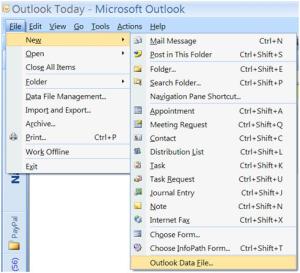
- Select Office Outlook Personal Folders File and then click OK.
- Decide where you want to the new file to be located (e.g., My Documents) and then on the File name field type a name for the new PST file.
- Click OK.
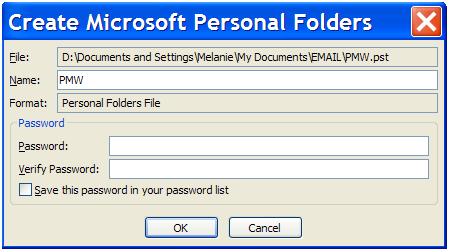
- In the Create Microsoft Personal Folders menu, type a Name for the new PST file and then click OK. (At this point, you can even apply a password to the PST file so that no one can access it by you. Good option to have if you?re not the only one using your PC.)
After you create this new PST file, it will be placed under All Mail Items below your current Inbox. Just start dragging email messages (or whole message folders) into this new ‘file cabinet’ and you’re done!
If you are having trouble making?Outlook Perform Better, Faster, Give Geek Choice a call at 800-433-5435 and one of our friendly Geeks can help!
Feb 18, 2010 | General, News, scam

Junk mail is the bane of any household, particularly catalogs from companies hawking products for which you have zero interest. Many of us, when arriving home from work, hate the daily ritual of filtering unwanted junk from the mail that we?re actually interested in reading.
Initially unveiled as just a beta, Catalog Choice is now an official registry that allows you to cut down on the clutter filling up your mailbox.
It?s completely free and easy to use, supported by more than 1,000 merchants complying with the requests made through this service.
After the registration process has been completed, you can browse their directory for any catalogs that have found their way to your mailbox. You can either put a halt to their delivery altogether or make it so the frequency with which they?re sent to your residence diminishes considerably. Once your choices have been made, Catalog Choice will contact the companies and inform them of your preference.
Be forewarned: It can take up to 12 weeks before you notice your changes.
If you?re like me, you look forward to a mailbox containing only that which is relevant, absent the unnecessary solicitations. For those of you who tire of finding your mailbox invaded by catalogs you almost immediately toss in the garbage bin, this service is a perfect means of putting an end to the unwanted junk.
Visit Catalog Choice here